🔗Connection Setup
Connection settings are found at:
Tools → BookLore Sync → Connection Setup
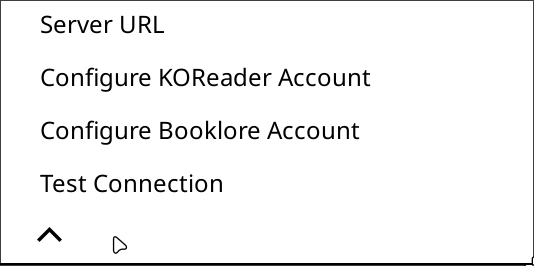
🔗Server URLs
Tap Server URLs to configure:
- Local URL: used on your home network.
- Remote URL: used away from home when automatic network switching is enabled.
- Home SSID: the WiFi name treated as your home network.
Format: http://<host>:<port> or https://<host>
Examples:
http://192.168.1.100:6060
http://your-url.local:6060
https://domain.example.com
Trailing slashes are not required. The plugin strips them automatically.
Enter only the base URL - do not append
/apior any path. The plugin handles all API routing internally.
Full HTTPS support is included. Make sure your server certificate is valid if using a public hostname, or configure KOReader to trust your self-signed certificate.
🔗KOReader credentials
Tap Configure KOReader Account to set the username and password the plugin uses for its primary connection to BookLore.
These credentials are used for:
- Authentication test (
GET /api/koreader/users/auth) - Book lookup by hash (
GET /api/koreader/books/by-hash/:hash) - Session upload (
POST /api/v1/reading-sessions)
The password is stored in plain text in the local settings database. When making requests to the KOReader sync endpoint, the plugin hashes it to MD5 on the fly and sends it as the x-auth-key header.
The username and password should match your BookLore account credentials.
🔗BookLore credentials
Tap Configure BookLore Account to enter credentials for the extended API features.
These credentials are used for:
- Rating sync (
PUT /api/v1/books/personal-rating) - Annotation sync (
POST /api/v1/annotations,POST /api/v2/book-notes) - Book search (
GET /api/v1/books/search)
The plugin logs in with these credentials to obtain a Bearer token (JWT) from POST /api/v1/auth/login. The token is cached in the local database and refreshed automatically when it is within 24 hours of expiry.
In most setups, the KOReader account and BookLore account are the same user. You can set both to the same username and password.
🔗Test Connection
Tap Test Connection to verify that:
- The selected connection target is correct (Local, Remote, or fallback).
- The server is reachable at the effective URL.
- The KOReader credentials are accepted.
The button is enabled once a server URL is configured.
A successful test shows:
Connection type: Local
KOReader: Success
BookLore: Success
by-hash endpoint: ok
A failed test shows a specific error message - for example, if the server is unreachable, if credentials are wrong, or if the health endpoint returns an unexpected status.
You can also use the dispatcher action
TestBookloreConnectionto test the connection from a KOReader gesture or button shortcut. See Gestures and Buttons for how to set this up.
🔗How authentication works
The plugin uses two separate authentication mechanisms depending on the API endpoint being called:
| Mechanism | Header | Used for |
|---|---|---|
| MD5 credentials | x-auth-user / x-auth-key | Session upload, book lookup |
| Bearer token (JWT) | Authorization: Bearer <token> | Ratings, annotations, book search |
You do not need to manage tokens manually - the plugin handles acquisition and refresh automatically.