🔗Shelf Sync
Shelf sync is a two-way sync feature. On the pull side, the plugin downloads books from a BookLore shelf source (standard shelf or Magic Shelf) to your e-reader, letting you manage your reading queue from the BookLore web UI. On the push side (standard shelves only), when you delete a downloaded book from your device, the plugin removes that book from the configured shelf in BookLore.
🔗How it works
flowchart TD
    A["Shelf sync triggered"]
    B["Phase 1: Fetch shelf metadata (subprocess)"]
    C["GET /api/v1/shelves - find shelf by name (case-insensitive)"]
    D{"Shelf found?"}
    E["POST /api/v1/shelves - create shelf"]
    F["GET /api/v1/shelves/{id}/books - fetch book list"]
    G["Phase 2: Per-book download loop (subprocess per book)"]
    H{"File already on disk?"}
    I["Skip - update local cache if missing"]
    J["Download book to download_dir"]
    K["Phase 3: DB writes + optional deletions (UI thread)"]
    L{"delete_removed_shelf_books enabled?"}
    M["Delete local files no longer on shelf"]
    N["Sync complete - show summary"]

    A --> B --> C --> D
    D -->|Yes| F
    D -->|No| E --> F
    F --> G
    G --> H
    H -->|Yes| I
    H -->|No| J
    I --> K
    J --> K
    K --> L
    L -->|Yes| M --> N
    L -->|No| N
Note: The diagram shows the standard-shelf fetch path. For Magic Shelves, phase 1 resolves the Magic Shelf source and fetches books through the Magic Shelf endpoints.
🔗Three-phase execution
Shelf sync runs in three phases:
| Phase | What happens |
|---|---|
| Phase 1 | The shelf is fetched from the server via a direct API call (a single short request - the brief freeze is acceptable on e-ink). The delta against the cached shelf state is computed: new books are queued for download, removed books are marked for deletion. |
| Phase 2 | Removed books are deleted from disk immediately (deletions are instant file operations and run before any downloads to avoid timing issues with the async download loop). If Delete removed shelf books is enabled, local files no longer present on the shelf are removed. The shelf state is persisted after deletions so a subsequent sync doesn't need to re-scan. |
| Phase 3 | New books are downloaded one at a time, each in its own subprocess. The UI thread polls the subprocess progress by checking the destination file size on disk, updating an InfoMessage progress bar with byte counts (Xs / Y MB (Z%)) and e-book title. Between polls the KOReader event loop runs, which means the progress bar actually renders on e-ink displays. Each book is hashed after download and queued for a single-transaction DB commit. |
A summary dialog appears after all phases finish, showing counts for downloaded, already-on-device, removed, and failed books. The dialog is scheduled on the next event-loop tick (via UIManager:scheduleIn) so it renders cleanly on e-ink after all sync cleanup (file manager refresh, wifi teardown) is done.
A persistent Cancel button is shown throughout. Pressing it finishes the current book cleanly before stopping, so no partial downloads are left behind.
🔗Push side: local deletion → shelf removal
When you delete a book file from your device (via the KOReader file manager), the plugin unassigns that book from the configured regular shelf source automatically:
POST /api/v1/books/shelves
{ "bookIds": [<id>], "shelvesToUnassign": [<shelf_id>] }
If the device is offline at the time of deletion, the removal is queued and retried the next time a sync runs.
Note: Magic Shelves are computed views. They are not directly assign/unassign targets, so this push-side unassign flow applies to standard shelves only.
🔗Prerequisites
- BookLore credentials configured (Bearer token authentication). See Connection Setup.
- Sufficient local storage in the download directory.
Note: For standard shelf sources, if no shelf with the configured name exists in BookLore, the plugin creates it automatically on first sync (as public by default). Magic Shelf sources are not auto-created.
🔗Setting up shelf sync
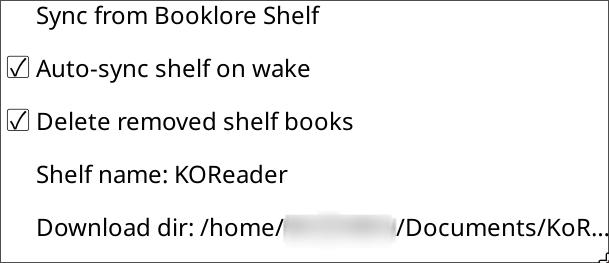
- Open Tools → BookLore Sync → Shelf Sync.
- Open Select Shelf.
- Choose Select shelf to load all accessible standard and Magic shelves from BookLore. Pick the shelves you want to sync - regular, Magic, or both. You can Skip either shelf type to leave it unconfigured.
- Optionally edit the source names manually via the Shelf source name (regular) or Magic Shelf name entries. Changing a name clears the cached shelf ID so it's resolved again on the next sync.
- Optionally change the Download dir (see Download directory below). A Reset button restores the auto-detected path.
- Optionally change Minimum free space - the disk-space threshold (in MB) below which sync stops before downloading the next book. Default:
500 MB. - Optionally toggle:
- Auto-sync shelf on wake - pulls the shelf 15 seconds after device wake, once Wi-Fi is connected.
- Delete removed shelf books - removes local files no longer on the shelf during sync. Disabled by default for safety.
- Use original server filename - saves books using the server's filename instead of deriving from the title. Enabled by default.
- Also delete sidecar (.sdr) on removal - removes KOReader reading-progress sidecars when a book is deleted. Only active when Delete removed shelf books is enabled.
🔗Shelf source resolution behavior
Each shelf type resolves independently:
| Shelf target | Resolution order |
|---|---|
| Regular | 1) Explicit source shelf ID (if set), 2) shelf name (case-insensitive), 3) create standard shelf by name if not found |
| Magic | 1) Explicit Magic Shelf ID (if set), 2) Magic Shelf name (case-insensitive) |
Both shelf types can be configured simultaneously. The selector stores both IDs. If you manually change a source name, the stored source ID is cleared and resolved again on the next sync. You can clear either shelf type by choosing Skip during selection.
🔗Download directory
Books are saved into a Books subdirectory, resolved in this order:
| Priority | Source | Example path |
|---|---|---|
| 1 | KOReader home dir setting | <home_dir>/Books |
| 2 | Device default home dir | <device_home>/Books |
| 3 | Known platform path - Kobo | /mnt/onboard/Books |
| 4 | Known platform path - Android | /sdcard/Books |
| 5 | Fallback | /Books |
You can override this path via Tools → BookLore Sync → Shelf Sync → Download dir.
A Reset button in that dialog restores the automatically detected path.
🔗Separate magic shelf folder
By default, magic shelf downloads use the same download directory as regular shelf downloads. You can optionally separate them:
- Open Tools → BookLore Sync → Display & Storage.
- Enable Separate magic shelf folder: ON.
- When prompted, enter a path for the magic shelf download directory. The plugin creates it if it does not exist.
- After confirming the path, the plugin offers to move existing magic shelf files from the shared directory to the new one.
When enabled, the Magic download dir entry becomes editable and shows the current path. Magic shelf syncs will use this directory instead of the shared download directory. Shared books (present on both shelves) are left in the main download directory.
To revert, disable the toggle. The plugin offers to move magic shelf files back to the shared download directory.
🔗Storage guard (minimum free space)
Before each download, the plugin checks available disk space and enforces a minimum-free-space threshold.
- Default threshold:
500 MB - Menu path: Tools → BookLore Sync → Shelf Sync → Minimum free space
If available space drops below the threshold, shelf sync stops before starting the next download.
🔗Filenames
Every downloaded filename has the BookLore book ID appended to the stem (e.g., My Book_42.epub). This tag is embedded regardless of the filename mode chosen below, and it is what the plugin uses to identify previously-downloaded files during subsequent syncs - so renaming or moving a file without preserving the _<id> suffix will cause it to be downloaded again.
The plugin supports two filename modes, selectable via Tools → BookLore Sync → Shelf Sync → Use original server filename:
| Mode | How the filename is formed | Default? |
|---|---|---|
| Original server filename (enabled) | Takes the filename stored on the BookLore server (the primary file's original name), strips its extension, appends _<id>, and re-adds the extension. | ✓ Yes |
| Title-derived (disabled) | Sanitises the book title from BookLore metadata, appends _<id>, and adds the extension. | No |
In both modes:
- Filesystem-unsafe characters (
/ \ : * ? " < > |) are stripped from the stem. - Consecutive whitespace is collapsed.
- The stem is truncated so the total filename (including the
_<id>suffix and extension) stays under 150 characters. - If neither the original filename nor the title produces a usable stem, the filename falls back to
BookID_<id>.<extension>.
🔗Triggering shelf sync
Shelf sync can be started in three ways:
|| Method | How |
||--------|-----|
|| Manual | Tools → BookLore Sync → Shelf Sync → Sync regular shelf / Sync magic shelf / Sync both shelves |
|| Auto on wake | Fires 15 seconds after device wake, once Wi-Fi is connected. Syncs regular then magic shelf automatically. Enable via Tools → BookLore Sync → Shelf Sync → Auto-sync shelf on wake. |
|| Dispatcher action | Assign booklore_sync_shelf (both), booklore_sync_shelf_regular, or booklore_sync_shelf_magic to a gesture or hardware button in Settings → Gestures. |
If WiFi is disconnected when manual or dispatcher-triggered shelf sync starts, the plugin attempts to enable/connect WiFi automatically first.
When shelf sync starts, a status dialog is shown with a Cancel button. The dialog title updates as each book is processed. The device UI is not usable during the sync - tapping outside the dialog does nothing.
🔗Full vs delta sync
Shelf sync uses cached shelf state to run incrementally (delta-based) after the first successful run.
- Normal sync compares the current shelf with cached state and processes only changes.
- Re-sync shelves clears cached shelf state first, then runs a complete sync pass. Sub-options let you target regular, magic, or both shelves. Use after manual filesystem changes (for example, if downloaded files were deleted outside the plugin and you want them re-downloaded).
🔗Cancelling a running sync
During downloads, a dialog with a Cancel button is shown. The dialog cannot be dismissed by tapping outside it - only the explicit Cancel button stops the sync:
- Sets a cancellation flag.
- The current book's subprocess finishes downloading cleanly (no partial files).
- All completed book cache entries are flushed to the database.
- Any pending deletions are completed.
- A summary dialog shows what was processed before cancellation.
Cancelling does not leave partial or corrupt book files on disk.
🔗Removing books from the shelf
If Delete removed shelf books is enabled, any book that was previously downloaded via shelf sync but is no longer present on the shelf will be deleted from the local download directory when shelf sync runs.
Warning: Enabling this setting will permanently delete local book files that are no longer on the shelf. Make sure your BookLore shelf represents your intended reading library before enabling it.
🔗Cross-shelf deletion guard
When both a regular and a Magic shelf are configured, the plugin checks the other shelf before deleting any file. If the same book ID is still present on the other shelf's cached state, the local file is kept - even when Delete removed shelf books is enabled. This prevents accidental deletion when both shelves share books.
If this setting is disabled (the default), books already on the device are never deleted automatically.
🔗Standard shelf creation
If no shelf with the configured name exists in BookLore, the plugin creates it automatically on the first sync:
POST /api/v1/shelves
Content-Type: application/json

{ "name": "KOReader", "icon": "pi pi-shield", "iconType": "PRIME_NG", "publicShelf": true }
The shelf name defaults to KOReader and can be changed in settings. Changing the shelf name invalidates the cached shelf ID so the new name is resolved on the next sync.
Note: Shelf creation only happens once. Changing visibility (public/private) of an existing shelf must be done in the BookLore web UI.
🔗SDR sidecar detection
When a book is downloaded via shelf sync, the plugin records its SDR sidecar path in the local database as soon as the file is first opened. This is the same database-backed detection used by the session tracker.
When Delete removed shelf books is enabled and a book is deleted during sync, the plugin also deletes all matching .sdr sidecar directories (using the stored path plus a disk scan for all three KOReader sidecar locations: beside the file, in the metadata folder, and the hash-named folder), provided Also delete sidecar (.sdr) on removal is also enabled.
🔗Credits
Shelf sync was originally created in a fork made by cporcellijr.
🔗Acknowledgements
The download-progress-tracking API method (APIClient:downloadBookWithProgress), the reworked shelf sync dialog with progress bar, and the associated progress display during book downloads were inspired by work from 0xstillb.